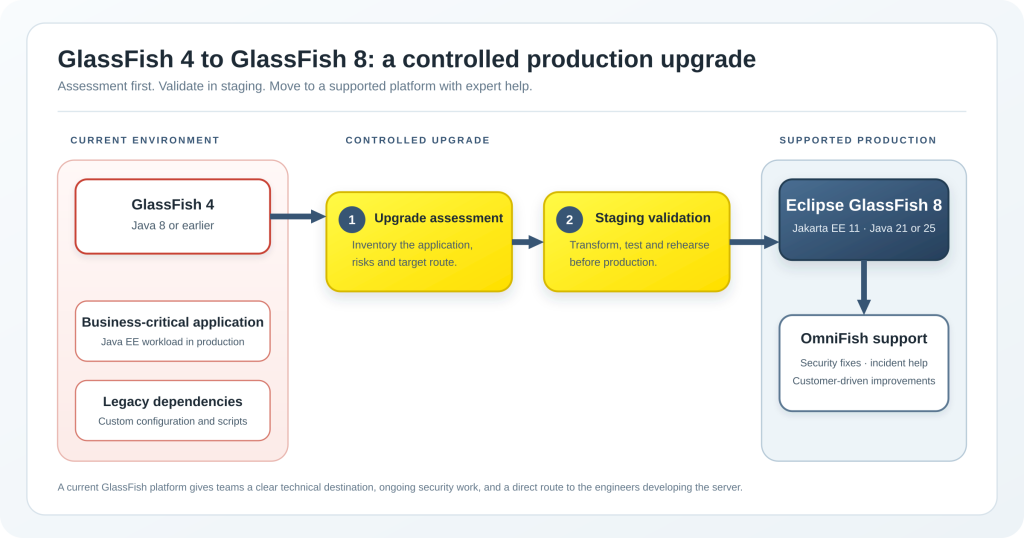
If a business-critical application still runs on GlassFish 4, the safest decision is to plan an upgrade now. Keeping an application on GlassFish 4 makes the surrounding platform harder and more expensive to maintain: the Java runtime is old, security patches are missing, dependencies age, and fewer people know how to keep it running in case of issues.
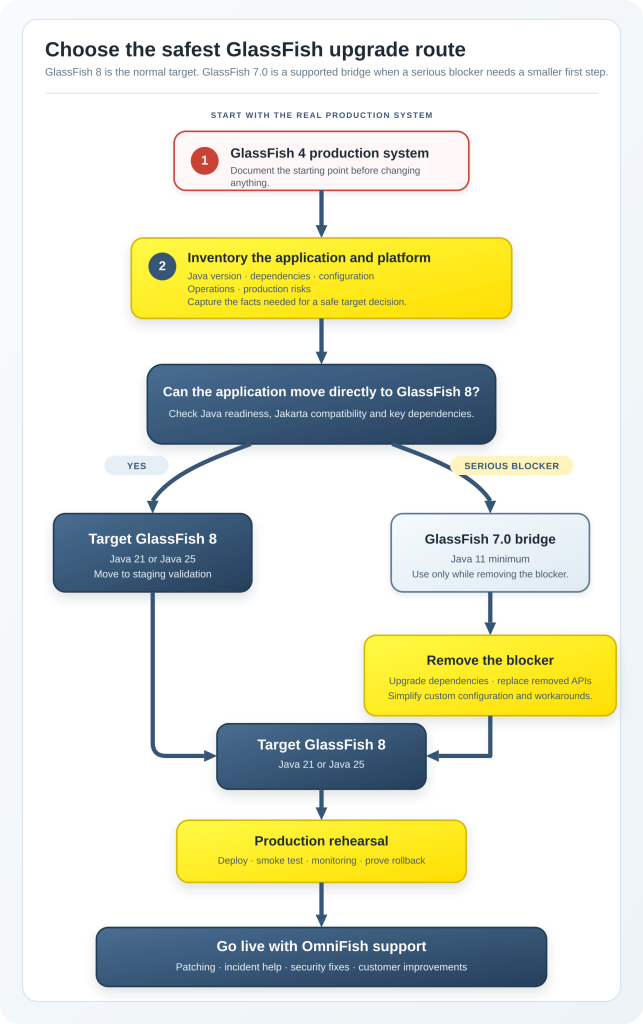
For most teams, Eclipse GlassFish 8 is the best upgrade target. It is a production-ready implementation of Jakarta EE 11, runs Java 21 or newer, and is tested with Java 25. Read more about the current platform in the GlassFish 8 release overview and on glassfish.org. When a serious upgrade blocker makes GlassFish 8 impractical as the first move, the latest GlassFish 7.0.x release is a valid second target. It gives teams a supported Jakarta EE 10 platform with a lower Java baseline while they remove the blocker and prepare the next upgrade.
Eclipse GlassFish is an open-source project hosted by the Eclipse Foundation. OmniFish is a member of the Eclipse Foundation and leads active development of GlassFish.
Our engineers work on new security fixes, performance improvements, and production features, coordinate new releases and ensure all releases are thoroughly tested. The project also benefits from its wider community of users and contributors.
GlassFish 4 creates a production risk, not only a technical inconvenience
GlassFish 4 does not run on Java 9 or newer. This keeps an application tied to an old unsupported Java baseline, unless you pay for an extended Java support. It also leaves the application on an old server without security fixes, dependency updates, bug fixes, and performance improvements. The GlassFish security fixes summary shows the continuing security work performed by OmniFish for supported GlassFish 7 and GlassFish 8 releases. When a customer needs to keep an older supported GlassFish branch in production for longer, OmniFish provides security fixes and critical updates as part of the support arrangement.
The risk is broader than individual CVEs. A legacy platform usually adds cost in several places at once:
Risk area
What it means in a GlassFish 4 installation
What a planned upgrade changes
Security
Older server components and an old Java baseline increase patching risk.
A current GlassFish release receives active maintenance and security fixes.
Java support
GlassFish 4 keeps the deployment on Java 8 or older.
Troubleshooting takes longer when server behaviour, scripts, and dependencies are old and poorly documented.
Current GlassFish has better tooling, logging, fixes, and commercial support from engineers who actively develop the server. OmniFish can investigate issues in the application, runtime, configuration, and GlassFish codebase itself.
Technical debt
Old libraries, redundant configuration, and special deployment steps make every change harder to test.
An upgrade gives the team a chance to remove unnecessary dependencies and simplify the deployment model.
Cost
Extended support for old Java and custom workarounds often cost more than a planned upgrade.
The work becomes a defined project with a test plan, an estimated effort, and a support route after go-live.
A production application can stay stable for years while its risk grows underneath it. That is why we recommend treating the upgrade as a platform-risk project. It should have an owner, a target date, a staging environment, and a rollback decision.
Start with the target, not with a direct server replacement
Do not begin by installing a newer server and deploying the existing archive. First choose the target that gives the best balance between risk now and maintenance later.
Target
Java baseline
When it is the right choice
What to review before choosing it
Eclipse GlassFish 8
Java 21 minimum. Java 25 is supported and tested.
Recommended target for most projects. It gives you Jakarta EE 11, current platform work, and the best path for future improvements.
javax.* to jakarta.* work, Java 21 or Java 25 readiness, deprecated and removed APIs. See the GlassFish 8 release overview.
Eclipse GlassFish 7.0
Java 11 minimum.
A good temporary target when a serious blocker prevents a safe first move to GlassFish 8. It gives a supported route to Jakarta EE 10 while the team removes the blocker.
Dependency compatibility, Jakarta EE 10 changes, and the plan for a later move to GlassFish 8.
Eclipse GlassFish 7.1
Java 17 minimum.
An option when its newer features fit the project and the Java 17 move is acceptable.
Internal bootstrap changes, old asadmin arguments, scripts or tools that rely on internals, IDE integration, and keystore handling. Read the GlassFish 7.1 upgrade notes.
GlassFish 4, 5, or 6
Old Java baselines.
Not recommended as a production target.
These versions do not provide a sensible long-term platform plan for a current production system and are generally unstable and insecure.
GlassFish 8 should be the expected end state. It has had several patch releases since its February 2026 release, and current releases continue to improve security, upgrades, and performance. If you must make the smallest possible first move, GlassFish 7.0 with Java 11 can reduce change scope. That should be a deliberate bridge to a later upgrade to a newer GlassFish version, not the end of the modernisation plan.
The main migration hurdle is the move from the javax.* namespace to jakarta.*. Much of this can be automated at source or binary level. Tools such as Eclipse Transformer and OpenRewrite can help identify and change many namespace references. They reduce manual work, but they do not replace architecture review and testing. Our Jakarta EE 10 and GlassFish 7 upgrade series explains the transformation options in more detail.
The harder problems usually appear in dependencies and old design decisions. Older monolithic Java EE applications often contain libraries that no longer have a compatible version, depend on APIs that are no longer part of the platform, or duplicate functions already provided by GlassFish. A transformed application may still fail because one library needs a replacement, an upgrade, or a small compatibility layer.
In our upgrade work, we also see installations with a large amount of custom server configuration. Some custom code or bundled libraries were necessary when the application was first built. Some now shadow functions that current GlassFish already provides. The upgrade is a good time to separate what is essential from what can be removed.
The following areas need deliberate review:
Area
Questions for the assessment
Typical action
Application code
Does the code use javax.* APIs, removed annotations, or removed APIs without a direct replacement?
Transform what can be automated. Replace or bridge the parts that cannot. OmniFish can provide bridges for specific missing parts.
Third-party dependencies
Which libraries need a Jakarta-compatible version? Which ones depend on APIs removed from the target platform?
Upgrade, replace, or isolate incompatible libraries.
Java runtime
Is the application currently on Java 7 or Java 8? Are build tools, agents, libraries, and operations scripts ready for the target Java version?
Choose the Java move as part of the application plan, not as a separate afterthought. Consider moving to a modern build system like Maven or Gradle.
Automation and tools
Which asadmin scripts, REST API calls, IDE integrations, deployment jobs, and monitoring tools are in use?
Document the setup and scripts, simplify them and evaluate which of them might be impacted by an upgrade
Operations
Can the team reproduce a production-like deployment, load test it, monitor it, and roll it back?
Build a staging rehearsal before choosing the production date.
Most of the established administration approach remains familiar. asadmin scripts and the administration REST API continue to be useful ways to automate GlassFish. However, the team should review scripts rather than assume they will behave unchanged. GlassFish 7.1 modernised internal bootstrap behaviour and removed some old asadmin arguments. It also uses PKCS12 by default for new domains, while retaining JKS compatibility. Identify scripts that deploy applications, libraries or connectors – these might need to be updated to be compatible with a new GlassFish version. See GlassFish 7.1: major new features and improvements for the related changes.
A practical upgrade plan for architects and platform leads
The upgrade should run as a sequence of decisions. This avoids spending months changing code before the team knows whether the real blocker is a library, a Java version, a certificate setup, or a production deployment process.
1. Inventory the running system
Create a short but accurate inventory before changing anything. Record the exact GlassFish version, Java version, operating system, deployed applications, WAR or EAR archives, deployed libraries, JDBC drivers, JNDI resources, security configuration, certificates, deployment scripts, and monitoring integration.
Also record what matters in production: peak load, response-time expectations, data stores, external integrations, maintenance windows, recovery requirements, and known incidents. An upgrade assessment without this information can estimate code changes but cannot estimate production risk.
2. Select the target route
Set GlassFish 8 as the default target. Choose GlassFish 7.0 only if the assessment finds a serious blocker that needs a smaller first step. Do not use older versions as a bridge. They add work without giving the team a supported production destination, and often contain bugs that can consume a lot of time to work around.
Choose the Java target at the same time. GlassFish 8 requires Java 21 or newer. If the wider application stack is ready, Java 25 is the preferred long-term target. A project using GlassFish 7.0 as an initial bridge can use Java 11 as the minimum route, then continue the Java upgrade after the application is stable.
3. Run a focused compatibility test
Transform a representative application build and deploy it to a clean target environment. This is not yet the full migration. Its job is to find the real blockers early.
Check the namespace transformation, deployment descriptors, dependency tree, removed APIs, persistence setup, security flows, integrations, and startup logs. If your application deploys and runs, test enough business flows to prove that the application is not only deployed but usable.
4. Simplify the environment before production
Keep only the configuration that the application needs. Review copied JAR files, custom class-loading rules, old workarounds, and server-side changes that no one has touched for years. Modern GlassFish may already provide a better supported way to achieve the same result.
This is also the point to check JDBC validation, connection-pool sizing, JVM options, certificate stores, secrets, access to the administration interface, and deployment automation. These details are often the difference between a successful functional test and a reliable production installation.
If unsure, OmniFish can review your current setup and suggest steps to simplify and improve it.
Use a staging environment that resembles production in its integrations, data shape, security configuration, and load as closely as practical. Rehearse the deployment, smoke tests, rollback, monitoring checks, and any data or configuration migration.
The output should be a short production runbook. It should name the people involved, the change order, the success checks, the rollback point, and the evidence to collect if something does not work.
6. Move to ongoing support after go-live
A successful deployment is not the end of the platform work. The team needs a patching process, an ownership model, monitoring, and a clear escalation path. OmniFish support covers production, pre-production, security patching, troubleshooting, upgrades, and migration help. Enterprise support includes a 24/7 critical production incident hotline and a one-hour response target for critical issues.
What we have seen in real upgrades
The following examples are anonymised. They show the kind of work that an assessment should uncover before a production date is chosen.
In one critical application upgrade from Payara 5 to GlassFish 7, we transformed the application to use the jakarta.* namespace with automated tools. One old dependency still required work because it depended on an API no longer present in GlassFish 7 and Jakarta EE 10. We replaced that function with a newer Jakarta EE-based approach. The application change took a few days to implement and test. After the migration, we also used newer GlassFish features to investigate and tune a memory-leak issue that had caused repeated downtime and maintenance work.
In another project, we upgraded a GlassFish 3 system to GlassFish 7 and moved the application from Java 8 to Java 11. The environment included many custom dependencies and configuration choices that duplicated functions already available in GlassFish. The customer first considered moving to GlassFish 4. We advised against that route. A defect in GlassFish 4 later blocked the planned move, while the GlassFish 7 route remained viable. We helped simplify the setup, added a small compatibility layer for an API removed in GlassFish 7, and completed the migration over several months.
The lesson is simple: a legacy upgrade is rarely only a namespace change. The work is usually manageable when the team finds the real blockers early, limits the scope of each change, and tests the production setup instead of only the application archive.
Modern GlassFish is not the old GlassFish 4 platform
It is understandable that some teams still associate GlassFish with its older history. But claims that GlassFish is not production ready or not supported are outdated and have not been true since 2022.
Eclipse GlassFish is an open-source project under the Eclipse Foundation. OmniFish leads the current development work behind the project and provides commercial production support around it. Our engineers maintain the server, prepare new releases, fix defects, handle security updates, and work on features requested by customers. This gives GlassFish users a practical advantage. A team using OmniFish support can work directly with engineers who know the server internals and contribute to the releases used in production.
Current Eclipse GlassFish is a production-ready Jakarta EE platform. It has active development, frequent releases, current security fixes, Jakarta EE compatibility, and commercial support from OmniFish. GlassFish Server provides the full application-server model for traditional enterprise deployments, including administration, clustering, and high availability. Embedded GlassFish provides a lightweight runnable option for containers, cloud deployments, and integration testing. Read the GlassFish 8 release overview for the current platform details.
How OmniFish can help
For a legacy project, the first useful step is an assessment. We review the application and setup, identify the upgrade path, find blockers, and prepare an optimised plan with time and risk estimates. We can then help with the upgrade through consultancy that follows that plan.
When the application is ready to run on a current GlassFish version in production, our support plans provide the next layer of confidence. We investigate incidents, fix defects and vulnerabilities, improve performance, and keep the platform current.
For customers with systems that cannot move immediately, we provide security fixes and critical fixes for older supported GlassFish branches. For new production requirements, we can assess requested GlassFish improvements or new features and prepare a development and release plan. This gives teams a direct route from a production requirement to the engineers working on the platform.
Get an upgrade assessment, a support plan, or help with a GlassFish issue from OmniFish, the team actively developing GlassFish.